nieceandtows@programming.dev to 3DPrinting@lemmy.worldEnglish · 1 month agoWhat is the problem here?imagemessage-square27linkfedilinkarrow-up137arrow-down10
arrow-up137arrow-down1imageWhat is the problem here?nieceandtows@programming.dev to 3DPrinting@lemmy.worldEnglish · 1 month agomessage-square27linkfedilink
minus-squareThePantser@sh.itjust.workslinkfedilinkEnglisharrow-up25arrow-down1·edit-21 month agoToo close, level the bed and increase the Z offset until the smoosh is right. Also since it looks like it’s in different places you should do a probe calibration to adjust for uneven surface.
minus-squarespitfire@lemmy.worldlinkfedilinkEnglisharrow-up2·1 month agoAlso preheating and waiting before bed leveling helps. These beds are wobbly. I’ve put a glass bed on top of the factory one on my K1
minus-squareJoelk111@lemmy.worldlinkfedilinkEnglisharrow-up2arrow-down1·1 month agoIn some places it’s too close, but in many places (like the top) it’s way too far away.
minus-squareRichard Wonka@slrpnk.netlinkfedilinkEnglisharrow-up1·1 month agoIt may have a probe levelling grid active that’s out of whack.

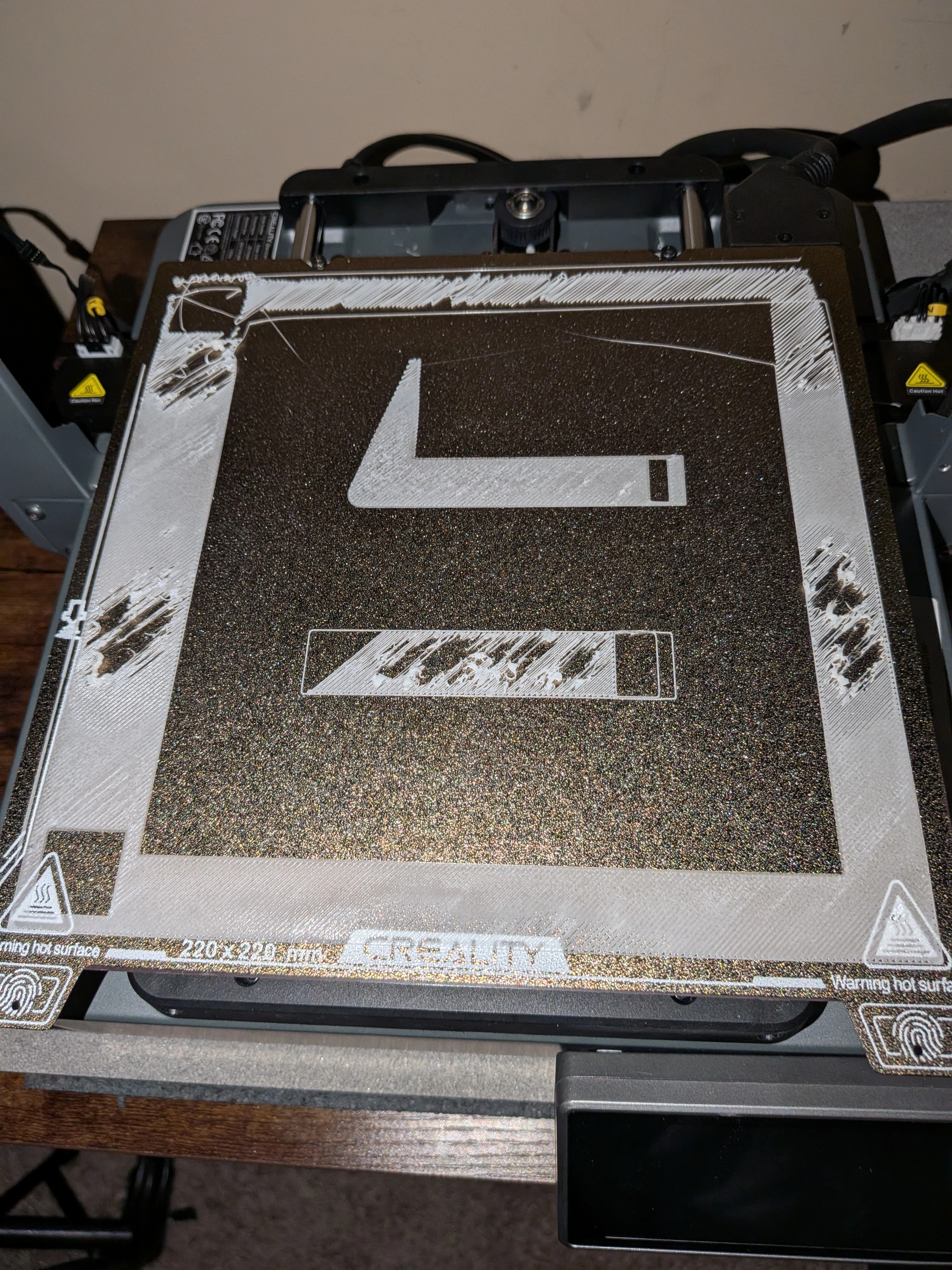
Too close, level the bed and increase the Z offset until the smoosh is right.
Also since it looks like it’s in different places you should do a probe calibration to adjust for uneven surface.
Also preheating and waiting before bed leveling helps. These beds are wobbly. I’ve put a glass bed on top of the factory one on my K1
In some places it’s too close, but in many places (like the top) it’s way too far away.
It may have a probe levelling grid active that’s out of whack.